OverTheWire Bandit is the perfect wargame for beginners to learn Linux basics and command-line skills. Each level requires finding an SSH password to progress to the next level.
- Host:
bandit.labs.overthewire.org - Port:
2220 - Connect:
ssh banditX@bandit.labs.overthewire.org -p 2220
Level 0 → Level 1
Goal: Log into the game using SSH and read the password from the readme file in the home directory.
ssh bandit0@bandit.labs.overthewire.org -p 2220
# password: bandit0

cat readme
Level 1 → Level 2
Password: PK8fYLZg2hnHSz83plBL1iEPKdD3QToB
Goal: Read a file named - (dash). Since - is interpreted as stdin by most commands, you need to specify the path explicitly.
cat ./-Level 2 → Level 3
Password: 7ZZ2LFrykP2zEyvBl4m3clcL7tGYJPME
Goal: Read a file that has spaces in its filename.
cat ./"--spaces in this filename--"Level 3 → Level 4
Password: xzTXq1rDJQVVAzdv5cHq1TQytTWufAMq
Goal: Find and read a hidden file inside the inhere directory.
ls -la inhere/
cat inhere/.hidden
What we learned: Files starting with . are hidden in Linux. Use ls -la to reveal them.
Level 4 → Level 5
Password: 6C7h9GD8M6ai5nr7wo1RonrzFjj9yIrG
Goal: Find the only human-readable file in the inhere directory among multiple files.
file inhere/-file0*
cat inhere/-file07
What we learned: The file command identifies file types. Human-readable = ASCII text.
Level 5 → Level 6
Password: pXa26xhMWaC2SvDotA4r9EgZkulOeSBW
Goal: Find a file with these properties: human-readable, 1033 bytes, not executable.
find inhere/ -size 1033c ! -executable -readable
cat inhere/maybehere07/.file2
What we learned: find command with multiple filters can narrow down files efficiently.
Level 6 → Level 7
Password: morbNTDkSW6jIlUc0ymOdMaLnOlFVAaj
Goal: Find a file somewhere on the server owned by user bandit7, group bandit6, and exactly 33 bytes in size.
find / -user bandit7 -group bandit6 -size 33c 2>/dev/null
cat /var/lib/dpkg/info/bandit7.password
What we learned: 2>/dev/null suppresses permission-denied errors to clean up output.
Level 7 → Level 8
Password: VR1ljMayciFxbnUokuQmJFw6QC9VKtub
Goal: Find the password stored next to the word “millionth” in data.txt.
grep "millionth" data.txtWhat we learned: grep is powerful for searching specific strings inside large files.
Level 8 → Level 9
Password: EjmOSvuAu7sGAHqHVcBDPirRe9T03kxl
Goal: Find the line that appears only once in data.txt.
sort data.txt | uniq -uWhat we learned: sort then uniq -u isolates unique lines from duplicates.
Level 9 → Level 10
Password: B0s2khmbT9u0geKuOoVGW3JZKhndE3BG
Goal: The password is one of the few human-readable strings in data.txt, preceded by several = characters.
strings data.txt | grep "=="What we learned: strings extracts readable text from binary files.
Level 10 → Level 11
Password: pYfOY6HwUsDj5rL9UvyhU7MCmv8vN5Ro
Goal: data.txt contains Base64 encoded data. Decode it to find the password.
base64 -d data.txtWhat we learned: Base64 is an encoding scheme commonly used to represent binary data as text.
Level 11 → Level 12
Password: GROozWPO8QyN0mGrjUkID0WCYkZiQxrN
Goal: data.txt has been encoded with ROT13. All letters have been rotated by 13 positions.
cat data.txt | tr 'A-Za-z' 'N-ZA-Mn-za-m'What we learned: ROT13 is a simple Caesar cipher. tr can perform character substitution.
Level 12 → Level 13
Password: qQYQiHOBPR8zR61qxYqX45quvihF2uzk
Goal: data.txt is a hexdump of a file that has been repeatedly compressed. Reverse the hexdump and decompress multiple times.
mkdir /tmp/bandit12work
cp data.txt /tmp/bandit12work/
cd /tmp/bandit12work/

# Convert hexdump back to binary
xxd -r data.txt > data.bin

# Check file type and decompress accordingly
file data.bin
# Repeat: gzip -d / bzip2 -d / tar -xf until you reach ASCII text
bandit12@bandit:/tmp/bandit12work$ xxd -r data.txt > data.bin
bandit12@bandit:/tmp/bandit12work$ ls
data.bin data.txt
bandit12@bandit:/tmp/bandit12work$ file data.bin
data.bin: gzip compressed data, was "data2.bin", last modified: Wed Jun 24 14:58:46 2026, max compression, from Unix, original size modulo 2^32 580
bandit12@bandit:/tmp/bandit12work$ gunzip data.bin
gzip: data.bin: unknown suffix -- ignored
bandit12@bandit:/tmp/bandit12work$ ls
data.bin data.txt
bandit12@bandit:/tmp/bandit12work$ mv data.bin data2.gz
bandit12@bandit:/tmp/bandit12work$ gunzip data2.gz
bandit12@bandit:/tmp/bandit12work$ ls
data.txt data2
bandit12@bandit:/tmp/bandit12work$ file data2
data2: bzip2 compressed data, block size = 900k
bandit12@bandit:/tmp/bandit12work$ mv data2 data2.bz2
bandit12@bandit:/tmp/bandit12work$ ls
data.txt data2.bz2
bandit12@bandit:/tmp/bandit12work$ bunzip2 data.bz2
bunzip2: Can't open input file data.bz2: No such file or directory.
bandit12@bandit:/tmp/bandit12work$ bunzip2 data2.bz2
bandit12@bandit:/tmp/bandit12work$ ls
data.txt data2
bandit12@bandit:/tmp/bandit12work$ file data2
data2: gzip compressed data, was "data4.bin", last modified: Wed Jun 24 14:58:46 2026, max compression, from Unix, original size modulo 2^32 20480
bandit12@bandit:/tmp/bandit12work$ mv data2 data4.z
bandit12@bandit:/tmp/bandit12work$ ls
data.txt data4.z
bandit12@bandit:/tmp/bandit12work$ mv data4.z data4.gz
bandit12@bandit:/tmp/bandit12work$ ls
data.txt data4.gz
bandit12@bandit:/tmp/bandit12work$ gunzip data4.gz
bandit12@bandit:/tmp/bandit12work$ ls
data.txt data4
bandit12@bandit:/tmp/bandit12work$ file data4
data4: POSIX tar archive (GNU)
bandit12@bandit:/tmp/bandit12work$ tart -xvf data4
Command 'tart' not found, but can be installed with:
apt install tart
Please ask your administrator.
bandit12@bandit:/tmp/bandit12work$ tar -xvf data4
data5.bin
bandit12@bandit:/tmp/bandit12work$ file data5.bin
data5.bin: POSIX tar archive (GNU)
bandit12@bandit:/tmp/bandit12work$ tar -xvf data5.bin
data6.bin
bandit12@bandit:/tmp/bandit12work$ file data6.bin
data6.bin: bzip2 compressed data, block size = 900k
bandit12@bandit:/tmp/bandit12work$ mv data6.bin data7.bz2
bandit12@bandit:/tmp/bandit12work$ ls
data.txt data4 data5.bin data7.bz2
bandit12@bandit:/tmp/bandit12work$ bunzip2 data7.bz2
bandit12@bandit:/tmp/bandit12work$ ls
data.txt data4 data5.bin data7
bandit12@bandit:/tmp/bandit12work$ file data7
data7: POSIX tar archive (GNU)
bandit12@bandit:/tmp/bandit12work$ tart -xvf data7
Command 'tart' not found, but can be installed with:
apt install tart
Please ask your administrator.
bandit12@bandit:/tmp/bandit12work$ tar -xvf data7
data8.bin
bandit12@bandit:/tmp/bandit12work$ ls
data.txt data4 data5.bin data7 data8.bin
bandit12@bandit:/tmp/bandit12work$ file data8.bin
data8.bin: gzip compressed data, was "data9.bin", last modified: Wed Jun 24 14:58:46 2026, max compression, from Unix, original size modulo 2^32 49
bandit12@bandit:/tmp/bandit12work$ mv data8.bin data9.gz
bandit12@bandit:/tmp/bandit12work$ ls
data.txt data4 data5.bin data7 data9.gz
bandit12@bandit:/tmp/bandit12work$ gunzip data9.gz
bandit12@bandit:/tmp/bandit12work$ ls
data.txt data4 data5.bin data7 data9
bandit12@bandit:/tmp/bandit12work$ file data9
data9: ASCII text
bandit12@bandit:/tmp/bandit12work$ cat data9
The password is qQYQiHOBPR8zR61qxYqX45quvihF2uzk
bandit12@bandit:/tmp/bandit12work$
What we learned: Files can be compressed multiple times with different algorithms. Always check with file before decompressing.
Level 13 → Level 14
Password: SSH private key file (sshkey.private)
Goal: Use the private SSH key found in the home directory to log into bandit14.
ssh -i sshkey.private bandit14@localhost -p 2220
cat /etc/bandit_pass/bandit14
What we learned: SSH supports key-based authentication as a more secure alternative to passwords.
Level 14 → Level 15
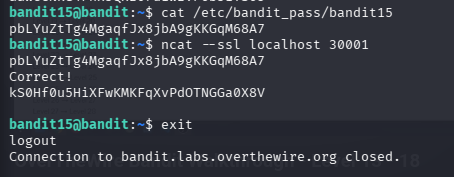
Password: aaWecNkG4FhxJQxz07uiwzVP6bJiYS65 , pbLYuZtTg4MgaqfJx8jbA9gKKGqM68A7
Goal: Submit the current level’s password to port 30000 on localhost to receive the next password.
echo "MU4VWeTyJk8ROof1qqmcBPaLh7lDCPvS" | nc localhost 30000What we learned: nc (Netcat) is a utility for reading/writing to network connections — useful for interacting with services directly.


Level 15 → Level 16
Password: kS0Hf0u5HiXFwKMKFqXvPdOTNGGa0X8V
Goal: Submit the password to port 30001 on localhost using SSL/TLS encryption.
echo "8xCjnmgoKbGLhHFAZlGE5Tmu4M2tKJQo" | openssl s_client -connect localhost:30001 -quietWhat we learned: openssl s_client allows you to connect to SSL/TLS encrypted services from the command line.
Level 16 → 17
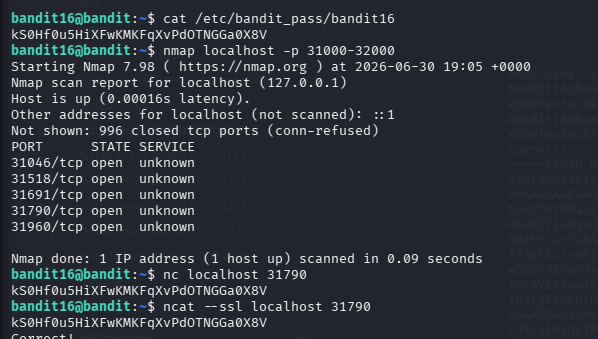
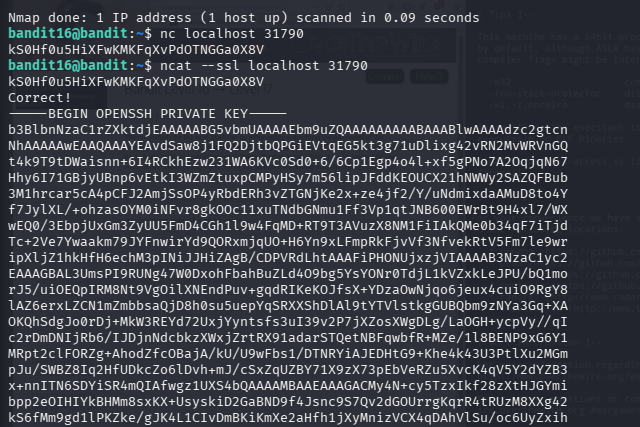
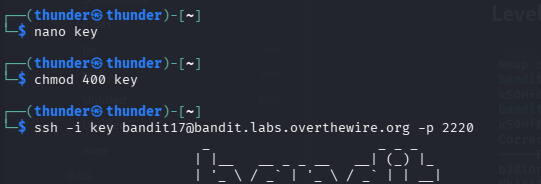
-----BEGIN OPENSSH PRIVATE KEY-----
b3BlbnNzaC1rZXktdjEAAAAABG5vbmUAAAAEbm9uZQAAAAAAAAABAAABlwAAAAdzc2gtcn
NhAAAAAwEAAQAAAYEAvdSaw8j1FQ2DjtbQPGiEVtqEG5kt3g71uDlixg42vRN2MvWRVnGQ
t4k9T9tDWaisnn+6I4RCkhEzw231WA6KVc0Sd0+6/6Cp1Egp4o4l+xf5gPNo7A2OqjqN67
Hhy6I71GBjyUBnp6vEtkI3WZmZtuxpCMPyHSy7m56lipJFddKEOUCX21hNWWy2SAZQFBub
3M1hrcar5cA4pCFJ2AmjSsOP4yRbdERh3vZTGNjKe2x+ze4jf2/Y/uNdmixdaAMuD8to4Y
f7JylXL/+ohzasOYM0iNFvr8gkOOc11xuTNdbGNmu1Ff3Vp1qtJNB600EWrBt9H4xl7/WX
wEQ0/3EbpjUxGm3ZyUU5FmD4CGh1l9w4FqMD+RT9T3AVuzX8NM1FiIAkQMe0b34qF7iTjd
Tc+2Ve7Ywaakm79JYFnwirYd9QORxmjqUO+H6Yn9xLFmpRkFjvVf3NfvekRtV5Fm7le9wr
ipXljZ1hkHfH6echM3pINiJJHiZAgB/CDPVRdLhtAAAFiPHONUjxzjVIAAAAB3NzaC1yc2
EAAAGBAL3UmsPI9RUNg47W0DxohFbahBuZLd4O9bg5YsYONr0TdjL1kVZxkLeJPU/bQ1mo
rJ5/uiOEQpIRM8Nt9VgOilXNEndPuv+gqdRIKeKOJfsX+YDzaOwNjqo6jeux4cuiO9RgY8
lAZ6erxLZCN1mZmbbsaQjD8h0su5uepYqSRXXShDlAl9tYTVlstkgGUBQbm9zNYa3Gq+XA
OKQhSdgJo0rDj+MkW3REYd72UxjYyntsfs3uI39v2P7jXZosXWgDLg/LaOGH+ycpVy//qI
c2rDmDNIjRb6/IJDjnNdcbkzXWxjZrtRX91adarSTQetNBFqwbfR+MZe/1l8BENP9xG6Y1
MRpt2clFORZg+AhodZfcOBajA/kU/U9wFbs1/DTNRYiAJEDHtG9+Khe4k43U3PtlXu2MGm
pJu/SWBZ8Iq2HfUDkcZo6lDvh+mJ/cSxZqUZBY71X9zX73pEbVeRZu5XvcK4qV5Y2dYZB3
x+nnITN6SDYiSR4mQIAfwgz1UXS4bQAAAAMBAAEAAAGACMy4N+cy5TzxIkf28zXtHJGYmi
bpp2eOIHIYkBHMm8sxKX+UsyskiD2GaBND9f4Jsnc9S7Qv2dGOUrrgKqrR4tRUzM8XXg42
kS6fMm9gd1lPKZke/gJK4L1CIvDmBKiKmXe2aHfh1jXyMnizVCX4qDAhVlSu/oc6UyZxih
Dpw2J02qqR34siWsjdUk1onOYCvaOPqZySD15vwbwBTlB0D10taFwhGSyqVMmaZIZ4LGyF
HEqzvo6Swo4Lor/3vICZJ5YLuUVa2GEEx5Ir1Np/fb3C+zKe37+HPf5lhDps2OWXNf1D/N
KhPt9QbhANoATORB+64nNw66/515vslhB7JMn4Yy/mJjJe0uR8cC4nnqXGBOy6lIFzbNQN
DastUidaMaqpswS49R5/Uq2YYOjbU+YCbBJz8qaz8eUMhlMsOI6b2XGwtr4rP9fENWrqxs
z3bYvw2I4t8G/OgZESZvn+DCTAuc/+/NtIeLDTeJJsUggkU5Xm4Xdmz1y0SwRqTRpJAAAA
wQCiE/31KZCUQJfwdZ1Ll6iXZ9ANreda++OlCkVQTGmfjnPAwpc2io/n0IkjE5Rch9bHkR
n/Pnm228x2TaWcq0FsyP9VnZQIw3LYPZxxouvV4ODFeThi6dJij9X7WnyvNVaeQam5Mqzd
6eI4L9f6p43JivvRLc7IrEDMjSXMcnlUbvEFa/143fpHZer9q+9qARUSLIodr8D6zde3l0
r88E0Z0YZrWn1BzjPZr2z+3GPTcfYPM+pLPT3OgAjd7gVr7pEAAADBAN2qsjh6rfgKHiou
n+pf1TUIXLzpnY+icwYcotvfhjweF1KwowzqnNjG0olJqc5B6O2g8FbeIn3a1v/896Ynb3
WXXYs1cCXGyyWxkw5nWaSWS8GMVEpjIgvW46hnrWmDVEPuW84wsgZ1yGnL0InHq3SmGMVe
7FLVoO2LD393RW/2RcMZ8mX/SWGLst9IunzxoEHGxJObKWv6C2IgQj8zHDpuE/6TwdDeFS
3KWM+JyggnB+EEssW7Tu+N2H+3mgLNbwAAAMEA2zuReO3x3LioX2U5O2ZmawKeajDKAUWh
OmfbD3ab8psuVcllydLWQfmJmJ7xXyAEtmO2kIg6ax6AEd4PLAgDC504v+bmLPjdvSwqGk
//vONxwDY+Uy3m3oX+MHK2KRq5Zd3YJd9Px6AF5iMbyiQYA69nsBumqt04Ihe8CFYHa9uG
KLE1QobuX5Wx6cWaOsc1j61vpaYDEwMUT8LeMFqKjN1rF1LMiNENBQhtd+ikJmYYwB01/5
Pfos/2C+rbNuHjAAAADnJ1ZHlAbG9jYWxob3N0AQIDBA==
-----END OPENSSH PRIVATE KEY-----
Level 17 → 18
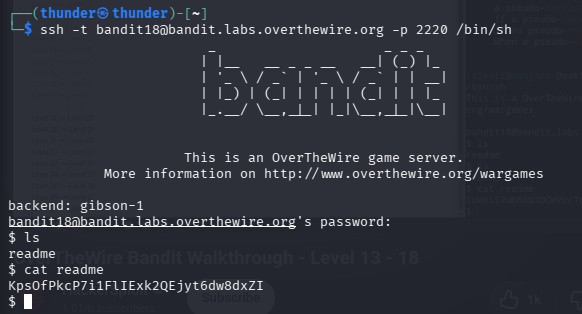
KpsOfPkcP7i1FlIExk2QEjyt6dw8dxZI
Level 18 → 19
KpsOfPkcP7i1FlIExk2QEjyt6dw8dxZI
Level 19 → 20
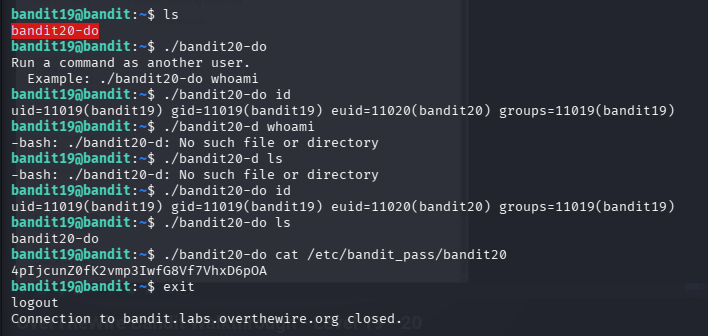
4pIjcunZ0fK2vmp3IwfG8Vf7VhxD6pOA
Level 20 → 21


bW9kBv5WC3P4yoDyf12LSdGuNz5ka6hY
Level 21 → 22
RYVux2rHEm9tiXHmLFzuR7Vhx6AZQMEz
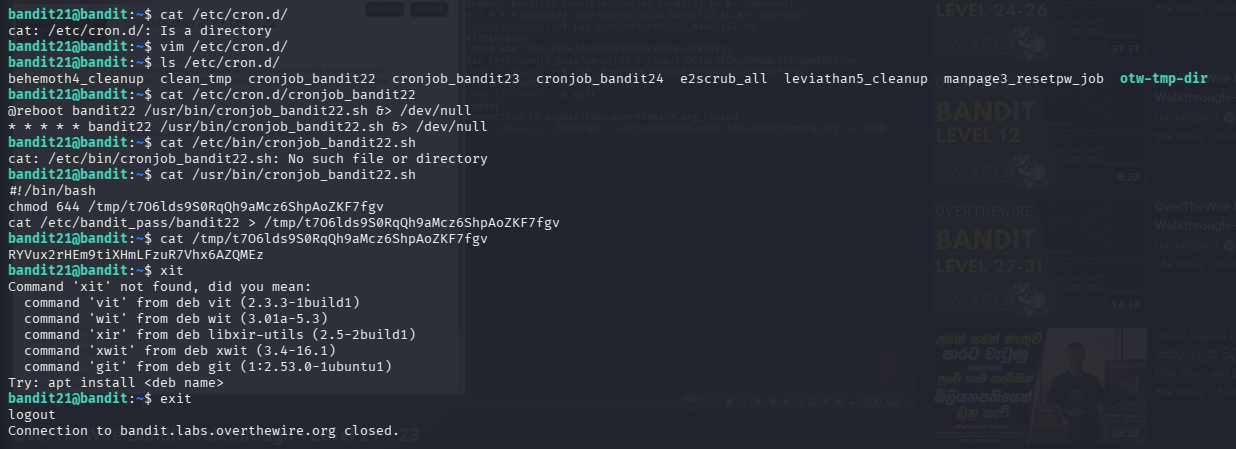
Level 22 → 23
gKXDTAXnIz3OBxiPjRZ2uqutUlPZrBsw
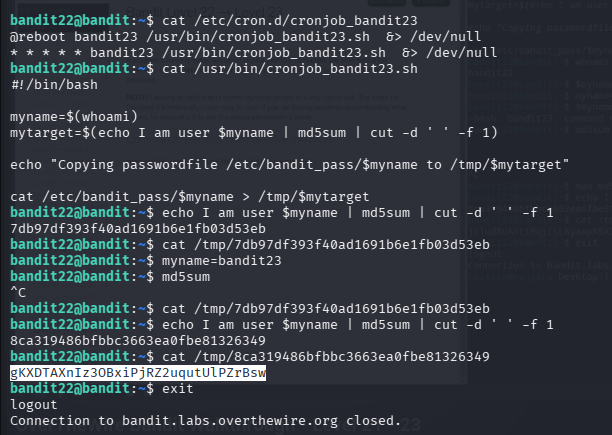
Level 23 → 24
hVQMk3lJNsmQ7VF3ubyrNNBom7BOgVXv
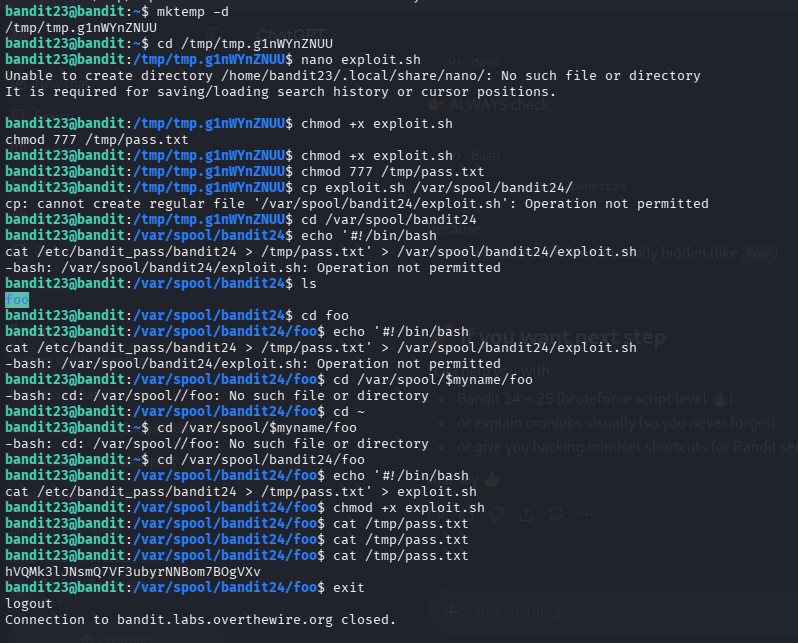
Level 24 → 25
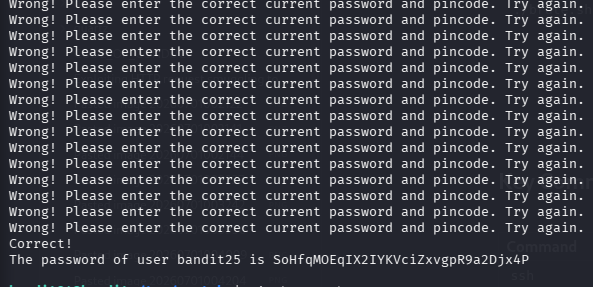
SoHfqMOEqIX2IYKVciZxvgpR9a2Djx4P
*vim brute.sh
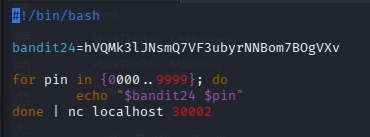
./brute.sh
Key Commands Reference
| Command | Purpose |
|---|---|
ssh | Secure remote login |
cat | Read file contents |
ls -la | List all files including hidden |
find | Search for files with filters |
grep | Search text within files |
file | Identify file type |
sort | uniq | Find unique lines |
strings | Extract readable text from binaries |
base64 -d | Decode Base64 |
tr | Translate/rotate characters |
xxd -r | Reverse hexdump |
nc | Netcat — raw network connections |
openssl s_client | SSL/TLS connections |